Comparison · 18 September 2026 · 5 min read
Separation Anxiety Apps Compared: Plans, Cameras, and What Each One Misses
Training apps build the plan. Pet cameras show the feed. Almost nothing does both. An honest comparison of what each tool covers, and where Duckie sits among them.
By Elio
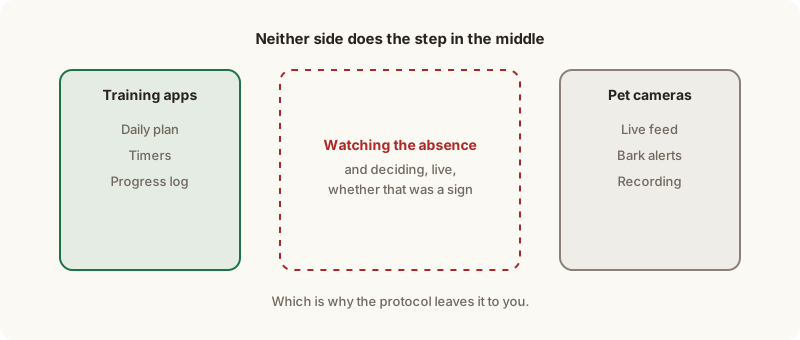
There are two kinds of product sold to owners working through separation anxiety, and they do not overlap at all.
One kind builds the plan. The other kind shows you the room. The step in between — deciding, live, whether what your dog just did counts as a sign — is left to you, and it is the step that owners consistently describe as the hardest part of the whole programme.
What do separation anxiety apps actually do?
They turn a training protocol into a daily schedule and keep a record of how it went.
That typically means a session built from a string of short departures, a timer, somewhere to log the result, and a progression rule that decides tomorrow's plan from today's outcome. It is real work, done well by several products, and it replaces the spreadsheet that most owners otherwise end up maintaining by hand.
What they do not do is observe. Every one of them takes your word for how the absence went, which means the quality of the plan depends entirely on the quality of your reporting.
How Duckie helps: Duckie records a pass or fail per step automatically, along with the clip of the first sign, so the log is not written from memory.
Which app should I use if I want a daily training plan?
Be Right Back is the one the community is built around, and Separation Buddy is the most common standalone alternative.
Be Right Back comes from Julie Naismith, whose method is what the main separation anxiety subreddit follows. It generates each day's plan from how the previous day went and includes a coach trained on a large body of real training sessions. As of September 2026 it is sold inside a three-month programme rather than as a standalone subscription, which is the main thing to know before planning around it.
Separation Buddy is a subscription app covering guided sessions, timers and tracking. Calm My Dog occupies similar ground, generating sessions from past ones.
If you want the method itself, Malena DeMartini's work covers the same protocol family and is worth reading alongside Naismith's.
How Duckie helps: Duckie does not replace any of these. It follows whichever plan you are already on and supplies the observations they ask you for.
Do any separation anxiety apps watch the camera for you?
No. As of September 2026, the training apps in this category have no camera and no automatic detection.
This is worth stating plainly because the product pages do not always make it obvious. Nothing in the planner category looks at a video feed. The owner watches, the owner judges, the owner types in the result.
Barksense sits slightly apart — it charts barking over time from a microphone — but audio alone misses the silent pacing and door-stationing that often comes first, so a barking chart is a partial view of the absence rather than a record of it.
How Duckie helps: movement, posture, sound and behaviour around the door are read together, so a silent dog who cannot settle is not scored as calm.
Is a pet camera enough on its own?
Only if you are willing to be the detector, which is the part owners burn out on. If you are still choosing one, what to look for in a pet camera for separation anxiety covers the features that matter.
Furbo, Petcube, Wyze, Blink and Eufy all give you a reliable feed and most will alert on barking. None carries a training protocol, and bark alerts without a next step are their own kind of unhelpful — one owner described a camera that "shames me: barking continuously for 2 minutes. I know."
There is a second cost that gets underrated. Watching the feed is genuinely stressful. Owners describe it as an anxiety pit, and several report that counting minutes on a camera was doing more damage to them than the absences were doing to the dog. Some end up switching the camera off, which removes the only source of information the plan runs on.
How Duckie helps: you leave and put the phone away. Duckie says "step done, come in" or "come back now" instead of asking you to stare at a feed.
Can you use a training app and a camera together?
Yes, and for most people that combination is the realistic answer.
The protocol has not changed and does not need replacing. What it assumes is a human watching every step and judging it accurately in real time, which works right up until you have a job, a plateau, and three weeks of sessions blurring together.
Run whichever plan you trust, learn to read the threshold yourself, and let something else do the watching and the logging, and bring both to your trainer if you have one.
What does each tool actually cover?
As of September 2026:
| Tool | Daily plan | Camera | Reads the feed |
|---|---|---|---|
| Be Right Back | Yes | No | No |
| Separation Buddy | Yes | No | No |
| Calm My Dog | Yes | No | No |
| Barksense | No | Microphone | Barking only |
| Furbo, Petcube, Wyze, Blink, Eufy | No | Yes | Bark alerts only |
| Duckie | Follows yours | Uses yours | Yes |
The right-hand column is the one worth reading twice. It is empty almost the whole way down, and it describes the step the protocol asks you to do on every single absence.
How Duckie helps: that column is the entire product. Everything else in the table, Duckie expects you to already have.
Final thoughts
If you already have a plan you believe in, a second planner adds very little. The gap in your setup is almost certainly the watching, not the scheduling.
Duckie works alongside Be Right Back, DeMartini's protocol, or a trainer's plan — it watches the absence, tells you when to come back, and hands the result to whatever you are using to decide tomorrow.
Common questions
- Is Duckie an alternative to the Be Right Back app?
- No. Be Right Back builds the daily plan; Duckie watches the absences that plan asks you to run. They cover different halves of the same protocol and are designed to be used together rather than instead of each other.
- Do I need a special camera for Duckie?
- No. Duckie works with a phone or a camera you already own. What matters is the framing — the view should include both your dog's resting spot and the door, since early signals usually appear at the door.
- Can a pet camera diagnose separation anxiety?
- No, and neither can any app. A camera shows you what your dog does during absences, which is genuinely useful evidence. Diagnosis is for a vet or a qualified behaviourist, and real footage is the most useful thing you can bring them.
- Are bark alerts useful for separation anxiety training?
- Only partly. They catch loud dogs and miss quiet ones, and a great deal of early distress is silent — pacing, panting, standing at the door. An alert also has to arrive with a recommended action, or it just tells you something bad is happening while you are away.
- Should I talk to my dog through the camera?
- Generally no. The common experience reported by owners is that a disembodied voice confuses an anxious dog and raises arousal rather than lowering it. Duckie deliberately has no talk-through button.
- Do I still need a trainer if I use an app?
- For mild cases many owners self-manage successfully. For severe panic, self-injury, or a dog that is not progressing after consistent work, a certified separation anxiety trainer working from your footage is worth the cost, and medication questions belong with a vet.